This section provides instructions on using the authenticated wireless LAN (KITnetX) on Linux.
The screenshot is taken from Ubuntu 22.04.4 LTS. Depending on the version, the location you click on and message may vary slightly.
Step-Guide
Enable the authenticated network connection (KITnet) in the user portal beforehand.
For detailed instructions, refer to Activating Services.
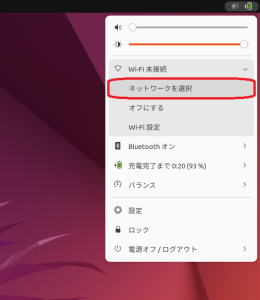
- Click the network icon at the top right of the screen and select "Select Network.
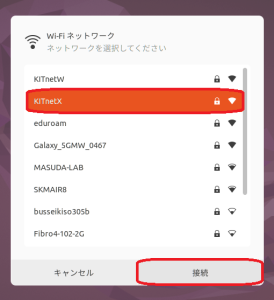
- Select KITnetX and click "Connect."
Enter the following details:
Username: Your CIS account login name
Password: Your CIS account password
Then, click "Connect."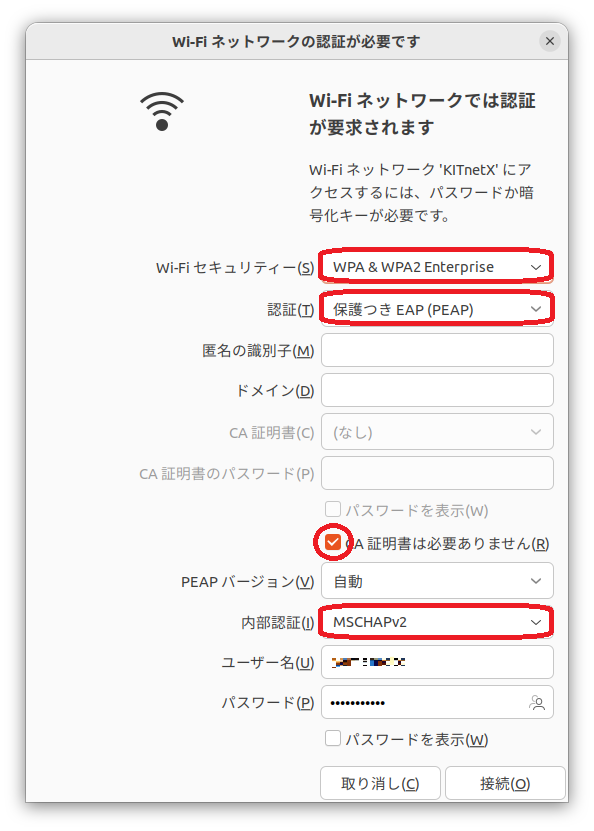
Wi-Fi security PEAP Authentication Protected EAP(PEAP) CA certificate No CA certificate is required
PEAP version Automatic Inner authentication MSCHAPv2 This service enables you to access websites and online resources within the university's information network.
For accessing websites and online resources on the Internet, please follow the configuration steps outlined in the Web Proxy User's Guide.