比較バージョン

キー

  • この行は追加されました。
  • この行は削除されました。
  • 書式設定が変更されました。
Sv translation
languageja

問題

Officeを起動すると、ライセンス認証の実行を促すメッセージが出るようになりました。どうすればいいですか?

解決方法

下記の手順をお試しください。

パネル
bgColor#fff

コマンド

プロンプトを管理者権限で起動し

プロンプトを管理者権限で起動し(*ページの下に説明あり)、以下3行のコマンドを実行してください(

*1行ずつ実行してください)。
(フォルダ名は Office のインストールフォルダで、名称が異なる場合があります。)

コード ブロック
languagebash
themeRDark
slmgr /skms kms.kit.ac.jp
cd "c:\Program Files\Microsoft Office\Office16"
cscript ospp.vbs /act

2つ目のコマンド(cd "c:\Program Files\Microsoft Office\Office16")は、32bit officeの場合は cd "c:\Program Files


(x86)\Microsoft Office\Office16" となります。)

Image Modified

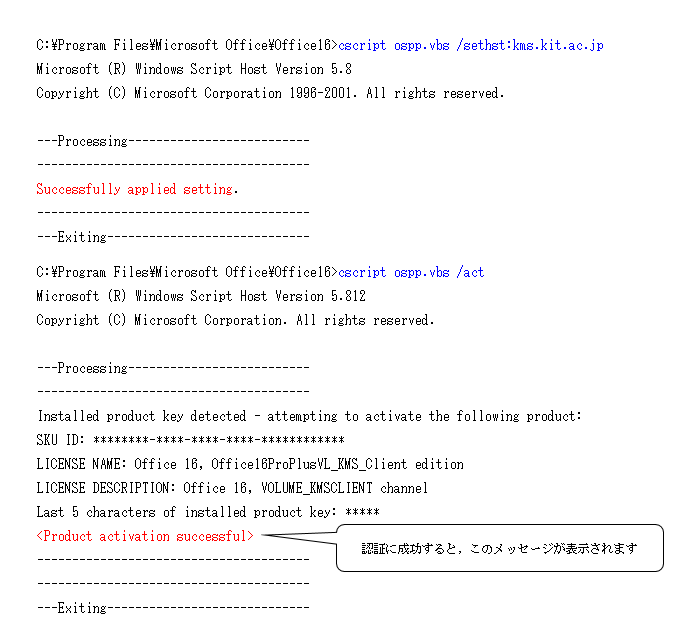
上記を実行してもうまくいかない場合は,さらに以下2行のコマンドを実行してください(1行ずつ実行してください)。

コード ブロック
languagebash
themeRDark
cscript ospp.vbs /sethst:kms.kit.ac.jp
cscript ospp.vbs /act

Image Modified

また、 0x80070005 エラーが発生する場合は Microsoft が公開している解決策をお試しください。

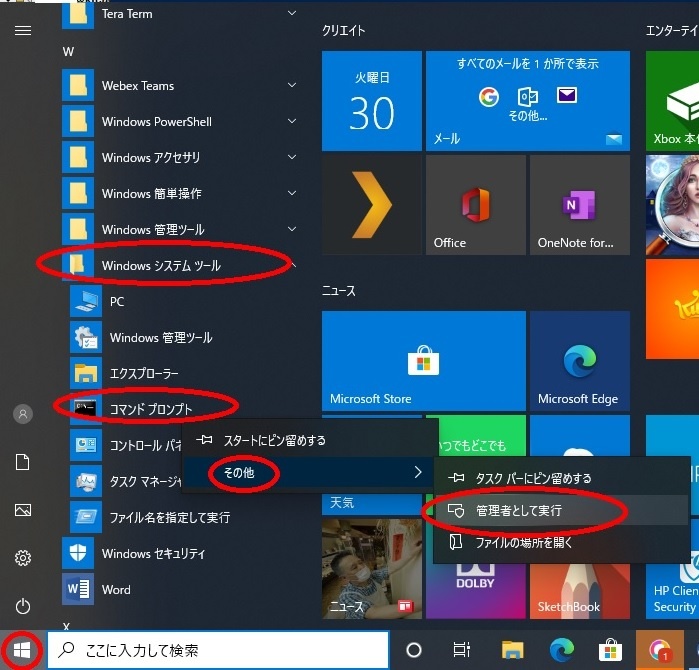
検索部で「コマンド プロンプト」と検索  → 管理者として実行 で起動してください。

Image Added

関連記事

ラベル別コンテンツ
showLabelsfalse
max5
spacesCISSUPPORT
showSpacefalse
sortmodified
reversetrue
typepage
cqllabel in ("office","ovs-es") and type = "page" and space = "CISSUPPORT"
labelsoffice ovs-es


ページ プロパティ
hiddentrue


関連する課題


Sv translation
languageen

Problem

When launching Office, I encounter a prompt asking for license authentication. What steps should I take?

Solution

Please follow the steps below:

パネル
bgColor#fff

Launch a command prompt with administrator privileges (see explanation at the bottom of the page) and execute the following three lines of command. (*Please execute one line at a time).
(Note: The folder name might vary, depending on the version of Office.)

コード ブロック
languagebash
themeRDark
slmgr /skms kms.kit.ac.jp
cd "c:\Program Files\Microsoft Office\Office16"
cscript ospp.vbs /act

For 32-bit Office, the second command should be: cd "c:\Program Files (x86)\Microsoft Office\Office16".
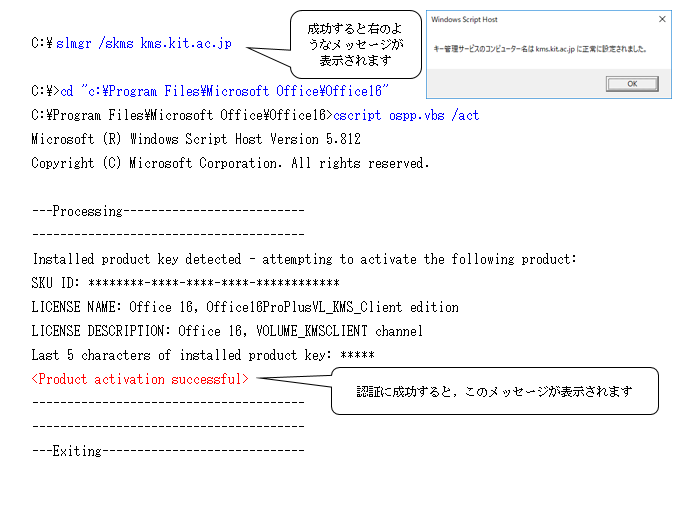
Image Added

If the above instructions do not work, please proceed to execute the following two lines of command. (*Execute one line at a time).

コード ブロック
languagebash
themeRDark
cscript ospp.vbs /sethst:kms.kit.ac.jp
cscript ospp.vbs /act

Image Added

Furthermore, if you encounter the 0x80070005 error, consider referring to the solutions provided by Microsoft.

The command prompt can be found in Windows System Tools (Windows 10) and Accessories (Windows 7). To access it with administrative privileges, right-click the menu and choose 'Run as administrator' (Windows 10) or 'Run as administrator' (Windows 7) from the options.

コマンド プロンプトは Windows システム ツール (WIndows 10),アクセサリ (WIndows 7) の中にありますので、右クリックメニューから その他 → 管理者として実行 (Wndows10),管理者として実行 (Windows 7) で起動してください。

Image Modified

関連記事

ラベル別コンテンツ
showLabelsfalse
max5
spacesCISSUPPORT
showSpacefalse
sortmodified
reversetrue
typepage
cqllabel in ("office","ovs-es") and type = "page" and space = "CISSUPPORT"
labelsoffice ovs-es


ページ プロパティ
hiddentrue


関連する課題